
Sneaky Ad Got Me…. Good. (aka the Story of How I Downloaded & Then Got Rid of the FunMoods Browser & Files)
 Deceptive Advertising gets to me in a big way.
I personally hate it. That's not a big revelation there, though, I'm guessing. 🙂
Well, this morning, it downright P*SSED ME OFF! (Excuse my language, but I'm mad.)
Here is the story of how I got the FunMoods browser (download) this morning… and I'll share how I got rid of it, too.
Disclaimer: There is some debate over whether Funmoods is a virus or not. I'm not saying that it is. However, I say, that considering it cost me HOURS of my workday today, I am not a fan. And, considering they sent me a nasty letter over this blog post, I'm even more irritated than before.
I considered taking this blog post down, but since there are over 63,000 results when you search “Funmoods virus” and even more when you search “Funmoods malware” (50,000 + results) or “Funmoods spyware” (30,000 + results) – it's apparent to me that others are struggling with “ISSUES” regarding this download, just as I did. Plus, if you read the comments, there are others who have lost time due to this “download”.
The Story…
First, I woke up this morning (thank God for another day). I got the kids off to school and came into my office. I opened my inbox and found a cool new course that I wanted to check out about how to use the software Paint.net (do not go get it yet, please).
So, I buy the course (Yay!) and set off to download Paint.net (Yay again!).
Then I get to the download page for the free software…
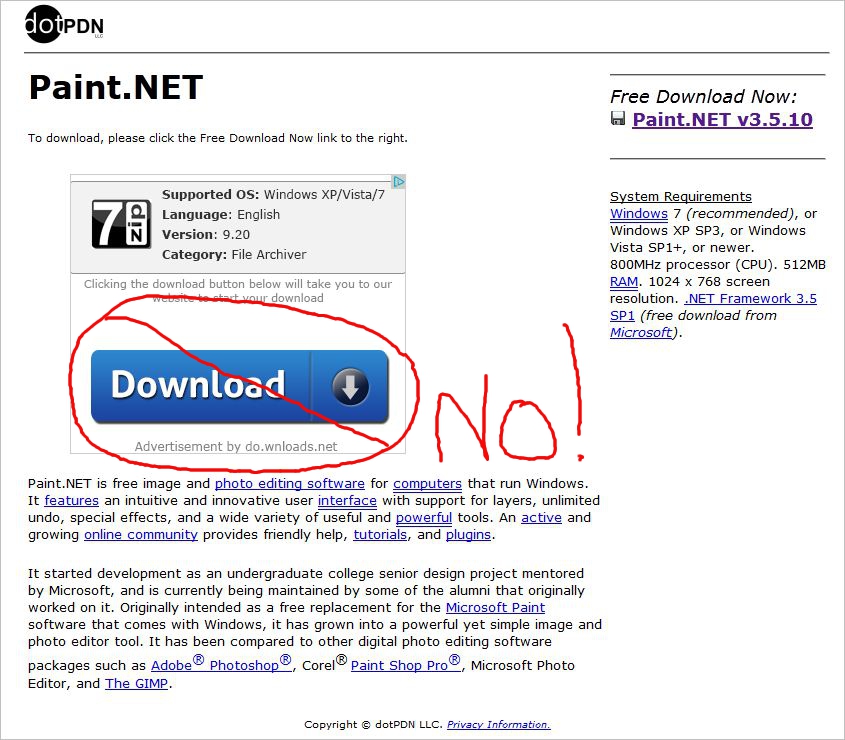
Now, granted, this was before my second cup of coffee, so guess which link I clicked? (If you guessed the one I've marked with a big X – you are right!)
Guess what that big blue “Download” graphic (ie blatant advertisement) gave me? Yep. The FunMoods download. It was a crappy ad, and I clicked and downloaded it all on my own.
If I had read a little bit closer, I would have instead seen the download link hidden in the upper right side of the screen. But nooooooo… I was in a hurry.
Update: If you want to download Paint.net – this site appears more trustworthy. Although, if you look at the bottom of this post, I have the link to download GIMP, another free program, instead.
What is the FunMoods (Download)?
They call themselves a search engine but I disagree.
Within moments of clicking “Download” for what I believed to be Paint.net – a graphics program, I knew something was up. My gut said “This doesn't look right” but again… I blame the lack of coffee in my bloodstream so I ignored it.
All of a sudden both my Firefox and my Internet Explorer browsers “blurped” and came back up with “FunMoods.com” as the default browser set on the sites.
I also noticed that I had a whole bunch of other files downloaded in my “Programs” folder, too.
I also got a fun new “FunMoods” toolbar that I didn't want.
So, the fun began. And, I will share just how I began to get rid of the junk.
Note: Watch the videos and check your PC to make sure you don't have any hidden spyware on your PC, too.
Step One: Uninstall the FunMoods Program(s) from your Computer
Step one was to remove the FunMoods program from my computer. That was easy enough and I figured that would be all that I'd need to do. (Wrong.)
Imagine my surprise when I looked at my recent programs and saw that more than FIVE new programs had been added today in that one wrong “click” on a mouse.
If you have Windows and want to know how to see if you have any hidden programs and to Uninstall those Programs, here's a video to show you how.
Step Two: Remove New FunMoods Firefox Addons
I deleted the programs which was all well and good, but there was still major wonkiness.
So, step two was to figure out what FunMoods had added to Firefox that wasn't showing up in the general programs.
I searched my Firefox Addons and discovered (shockingly) that there were new Addons installed. Yay! (NOT!)
So, here's how you check your AddOns in Firefox and disable those that you do not want there.
The files also changed my Internet Explorer settings but I didn't record a video for how to fix that one. Let me know if you need help with it and I can.
Step Three: Reset your Default Page
The first two steps went pretty smoothly for me. But, no matter what I did, I could not get rid of that FunMoods page every time I reopened Firefox.
I was sorely tempted to pour myself a glass of wine, but it was only 10 am. (Sooooo tempted….)
Here's what I did next.
Again, I had to update my default page in both Firefox and Internet Explorer, but I only recorded a video for Firefox. I hope it helps.
Now, granted, I am not a security expert, and I fully intend to bug both my husband and my Virtual Assistant to do some more research on this spyware before feeling secure. But, these steps at least got me back on my feet for the time being.
Let me know what you think. Did I miss anything? I would love to hear your thoughts.
Warmly,
Nicole Dean
PS. Thankfully this could have been a lot worse. If you're being lackadaisical with your business security and online presence, be sure to check out my guide to protecting your online business.

Click here for simple ways to protect your Online Business.
Recommended Resource:
Get Gimp – a FREE Program to Edit Photos & Add Backgrounds
The good news is you can also do it all with GIMP which is a totally free program (and, in my opinion, safer to download).
Click here -> To learn How to Download Gimp for free.
Learn How to Use Gimp
If you want to skip some of the learning curve and have a Gimp resource you can refer back to I’d like to invite you to check out a gimp graphics video course that you can sign up for.
AND – because I am awesome I’ve got a $10 off coupon code for you: nicolerocks
Here’s where you go to order and get $10 off:
Click here to Learn to Use Gimp
Be sure to use coupon Code: nicolerocks
Marilyn aka G-Ma
August 20, 2012 at 3:26 pmI got that, too. Can’t remember which program I got it from. Took me quite a while to get rid of it. Another one that I had a hard time getting rid of is Babylon. I searched online and found out how to get rid of it.
Loretta
August 20, 2012 at 2:40 pmI *hate* those advertisements that are designed to look like a download on a download page!!! I’ve clicked them by accident before myself when I was in a hurry for a project and the same thing happened to me. It was such a PAIN and it is a serious day-ruiner.
Haggard Ryder
August 21, 2012 at 2:38 pmHeck, sometimes you do not even need to be in a hurry. Some of them are so camouflaged they look like the guy you are trying to download, period. I hate those sites with a passion.
The internet is getting to be a risky place to do business. Viruses are all over the place as is pesky malware and etc.
Good post and thanks Nicole.
William
August 20, 2012 at 5:10 pmThanks Nicole, the information was very helpful but where did you ever get the idea that 10 am is to early for a glass of wine. If anyone asks, just tell them your having grapes. I have had these downloads that just mess up everything you’ve worked for and I hate them. You fixed yours in only a day. I have spent up to a week and a little money to get some removed. There should be something we could do to fight back.
Debra Marrs
August 20, 2012 at 6:27 pmOh, gosh! Thanks so much for saving me the hassle you went through today, NIcole. I took advantage of the Learn Paint.net too but hadn’t downloaded the software yet. Had it not been for your warning, I probably would have made the same mistake. You are without a doubt the BESTEST to alert us to this potential harm. Thank you, Thank YOU!
Lorraine Moodie
August 20, 2012 at 6:54 pmSame thing happened to me recently. Can’t remember which download it was, and as soon as I clicked the link, I knew it was a mistake. It changed my browser and my home page, which wasn’t the worst thing, but downloaded a bunch of other totally useless programs on my hard drive that were a pain in the rear to get rid of. There oughta be a law!
Cathy Stucker
August 20, 2012 at 6:05 pmNicole, I once got hit with a nasty virus without warning–all I did was click on a search result in Google. One thing I learned from that is to do a System Restore (Windows) as well as removing the malicious programs. Most Windows systems set at least a daily system restore point.
Make sure you choose a restore point that is BEFORE you got hit with the virus or malware.
When you do a system restore it does not delete any documents or email, but it will remove any programs installed since the last restore point and it will also remove registry settings changed by those programs.
Windows help will tell you how to run a System Restore–it is a good thing to know about.
P.S. Forgive me, techies, if some of this is a little vague. I am just techie enough to know about system restore and how to do it, but not techie enough to understand all of the details.
Cindy Bidar
August 20, 2012 at 6:07 pmIt is so easy to install bad stuff on your computer! I see this kind of thing all the time with file sharing sites like sendspace that have so many links on them it’s nearly impossible to find the right one. Then of course there are the legitimate apps that want to install all kinds of “helpful” add-ons as well. You have to always be on your guard, and read everything.
Good for you for turning your anger to good and warning the rest of us. 🙂
Alan Petersen
August 20, 2012 at 6:30 pmI recently got nailed with something similar on my smart phone. Too bad I wasn’t smart enough to realize that if it’s free… beware. 🙂
I installed a free app on my HTC Droid phone. It was the brightest flashlight. The next day when I accessed the Internet via my phone, my default browser Google was changed to this weird search like site that I had never heard of and was plastered with ads. I Googled it and discovered it was the stupid flashlight app. Of course, I didn’t really read the terms, but I’m guessing they put verbiage in there, where I gave the okay.
I had to uninstall the app, then delete it, then clear my cache and re-start my cell phone. Took about 40 minutes, including search time. I was so mad.
So beware of the free apps and read the terms!
Jodie B
August 20, 2012 at 6:37 pmI have been the go to person for pretty much every who knows me when it comes to viruses and hacked sites. I even have a new book out (http://www.the-osp.com/products) about protecting your WordPress and be prepared to get back up super quick if it does go down.
Anyway, my advice to you is (if you have not already) download MalewareBytes (I use the freebie and I am in no way affiliate with them). They are the very best at finding all sorts of hidden malware and will clean off 99% of the crude out there.
Another goodie is SuperAntiSpyware (again the freebie and I just love them I don’t get anything for say so). I actually run them both often and have them on every computer I have ever touched or worked on.
Lauren
August 20, 2012 at 6:37 pmCouldn’t you just have restored back to before the new installs today? Isn’t it possible to set the computer to perform an automatic restore point before installs?
That would have been my first go at getting rid of it?
Carolyn
August 20, 2012 at 6:40 pmI saw that exact download page today and it was very deceptive because of that huge download button! Those sites where free software/programs can be accessed are good to a point but I think I’d rather have to pay and avoid these sneaky tactics Fortunately I decided not to download it as my computer will need replacing soon. Thanks for the informative videos. It’s a good reminder about how to check for unwanted programs.
RichardP
August 20, 2012 at 6:52 pmThanks Nichole, this is really a great post and valuable help.
I’m going to post a link back to your post from my Security Alert Blog.
It’s probably one of the best “How to get rid of a Virus”
presentations I’ve seen.
JAson
August 20, 2012 at 7:00 pmI just don’t understand how anyone would think that by causing you all that problems, that it would benefit them in any way ($$$$) Would anyone in there right mind want anything to do with FunMoods if they took over your computer in the first place?
Christine Cobb
August 20, 2012 at 7:22 pmThese days free is not free. Even downloads from Cnet has toolbars and such clicked to install by default. Java updates want to install the Ask toolbar. Pretty much you just have to slow down and read every screen and never take the quick install option.
Rob
August 20, 2012 at 7:45 pmI got a similar virus recently, but have no idea how. I clicked on a link to a windsurfing site I wanted to check out and a virus warning came up from an “antivirus” site I don’t use. It proceeded to start doing a miraculously quick “virus scan” and told me I had about 120 viruses. First I tried stopping it, but that didn’t work. Then I tried opening Avira, but the same “program” told me Avira was infected. Then I tried going to Add-Remove programs and was told the same thing. After the “scan” was completed, they “kindly” told me that if I upgraded to their silver edition, they would get rid of all my viruses for me. To do that, of course I had to give them all my personal details, including credit card. Instead, I took the computer to my local shop and they managed to get rid of the program on DOS, I think. Both they and I did virus scans afterwards and there was only one. I assume it was theirs.
Wish I’d taken notes like you did. I was so panicky, I forgot everything, even the name of the “antivirus” program.
Bruce Walker
August 20, 2012 at 11:07 pmDefinitely go for the glass of wine next time.
Bob Lampard
August 21, 2012 at 3:59 amThanks Nicole,
I too received the email for the course on how to use paint.net. Luckily the email, despite saying paint.net was free, only gave the link to the course and not the actual software.
Being a serial procrastinator when it comes to spending money for things I like the look of but will probably never use, I got the hump because the email had rattled on about this wonderful free software and didn’t tell you where it was.
I had made a note to investigate this further when your link to this blog post arrived.(See, I always read your emails!) Brilliant. I owe you one for saving me wasted time because I would have undoubtedly done the same.
For once my dithering paid off!!
Bob
Denise OBerry
August 21, 2012 at 5:30 amSo sorry to hear this happened Nicole and thanks SO MUCH for sharing your experience and learning with us. It’s a good reminder that we need to slow down and pay attention to what we are doing. I truly hate those download sites. They have so much stuff on them it’s often tough to figure out exactly what to click.
Mathea Ford
August 21, 2012 at 6:23 amThis is an awesome blog post. It really makes me mad when I spend part of my day trying to clean up a virus on my computer. This happened a couple of months ago when I somehow got a virus via Skype (I have since changed my settings to reduce my chances of getting another one) and it was using a huge amount of my internet and it ended up taking almost 2 days before I was sure it was gone.
It’s a good reminder to lock up your website as well – I have had one of my websites hacked and all the websites on that account were at risk – luckily I did backups so I could just delete the entire site and reload a previous version then proceed to figure out how to secure it. I almost lost 10 websites because of that.
It’s frustrating when you spend hours on line trying to help people then have to experience this type of abuse!
Shawanda
August 21, 2012 at 9:51 amArgh! This ticks me off too. Those big download buttons are intentionally deceptive. If there’s a big button in your face that’s screaming DOWNLOAD, you usually don’t think to inspect the rest of the screen for another download link. I too have to be more careful when downloading free software.
Regina Smola
August 21, 2012 at 8:52 amHey Nicole,
Let’s just say I’m walking funny right now cuz my panties are in a knot reading what happened to you, as well as so many others. I’ve seen it over and over and like you, have to have at least 2 cups of coffee in me before attempting to click on any download link.
It just makes my blood boil. Most of these ads run through google[dot]com/doubleclick/ and googlesyndication[dot]com. SHAME on Google for allowing this type of advertisement (and malware!!!). Looks like their ethics and guidelines went right out the window.
Nicole, this post on how you got a computer virus from clicking the wrong “download” link is so important for all of us to read. Thanks for sharing your story and making us all aware.
Cathy
August 21, 2012 at 9:57 amI did the very same thing on that site and I can’t even blame lack of coffee for my blunder.
They just make it look like that’s the link you are supposed to click to get the program. I’m sure at least 70% of us click that link by accident.
Sneaky…
momsbusy247
August 21, 2012 at 10:35 amThose… so and so’s got me too and I don’t even remember downloading anything (I must have). I was so glad to read this and get all the info on how to uninstall it all.
Thanks so much Nicole.
Nicole
August 21, 2012 at 10:46 amI got hit with nasty malware once. The first think I did was call Hostgator, my web host. They got rid of the malware that had hacked my site and advised me to buy an anti malware program and recommended a few to get rid of any malware that may have gotten onto my computer. I ended up buying Malware Bytes for about $30. It can do a full scan and it found all the malware on my computer and destroyed it. It also gives you a report. It looks like the kids had picked some malware up playing kids computer games. This program runs in the background and has warned me several times since thus avoiding more trouble!
Sharyn Sheldon
August 21, 2012 at 10:31 amOuch! I’ve done the same sort of thing on a much more reputable site (I think it was Cnet) when downloading a free antivirus software. There’s always a box there that’s for another antivirus program of some sort that’s actually a “test” program. You download it, the program searches for all your supposed viruses, and then they suggest you pay for the program to remove the viruses. Total scam as far as I can tell. The button usually says something like “start download”, so unless you look closely at the fine print you can’t be sure if it’s the right thing you’re downloading.
And the fine print is so little that you’d better make sure you have your reading glasses on!
– Sharyn
Lynette Chandler
August 21, 2012 at 11:22 amThis is something I’ve shared on and off with my readers and taught in one of our training classes earlier this year.
Install a Sandbox program and *only* get online with it on. There are various sandboxing programs but my utmost favorite is Sandboxie which you an use for free or upgrade if you feel it saves your bacon often. It has certainly done that for me.
Cheryl Chartier
August 21, 2012 at 11:30 amWow that does stink. Thanks for the informative video’s.
Does anyone know about Blekko – every time I load firefox, Blekko is my search.
Linda
August 21, 2012 at 12:13 pmOne word… Malwarebytes… it’s free and the best damn program out there… it’s saved my butt many a time when no other program could… it’s free… just install it on your computer and keep it updated… never know when you’re gonna need it…
Dacia Stuckey
August 21, 2012 at 12:36 pmI know just how you feel Nicole. I recently downloaded a free software program and I thought I read all of the Instructions. When the installation was complete I noticed that there were other programs added including Funmoods. I was like “What the heck is this?” I uninstalled most of the programs right away which was easy.
When I uninstalled Funmoods I noticed that I still had the Toolbar. I also had to reset the Toolbar settings but I noticed that it was still there. I tried everything to get rid of it but it’s just like a pis ant (excuse my language but I’m frustrated) that won’t go away.
Nowadays when I open my laptop I am disgusted that I the first thing staring me in the face is Funmoods. I’m stuck with it. What else can I say?
Althea Young
August 21, 2012 at 5:40 pmOh that’s quite horrible. It’s really hard to trust any sites.
I became a victim too Nicole, for so many times, I blame my poor curiosity to check those trusted sites.
but thanks for sharing a trustworthy link for the Paint.net
Regina Smola
August 21, 2012 at 6:08 pmI agree with using Sandbox programs and MalwareBytes and use them myself. Unfortunately, there are zero-day viruses out there that AV programs may not catch or people that don’t have their anti-virus programs on auto-update.
I’ve gotten to a point now that if a webmaster is so desperate to make a few cents off a PPC to give me a free download I’d rather pay for it from someone reputable. Or I’ll email the site owner directly and ask for them to send me the download directly.
Toolbars are one of my pet peeves!! There are only a few good ones out there. And it’s amazing how many things I’ve installed that had a checkbox to install the McAfee toolbar.
Christine Holroyd
August 21, 2012 at 7:26 pmFirst of all, congrats on spelling lackadaisical the correct way. So many people add an ‘s’ after the ‘lack’ especially when saying the word 🙂
I can’t believe how timely this is for me. I’ve just purchased at very low cost both Paint and Gimp training from some reputable guys but haven’t yet downloaded Paint.
Now, thanks to you Nicole, I will know which download button to press. I have enough issues with my computer which do my head in, so I’m not up for more.
Thankyou, thankyou and thankyou again!
Christine.
Eric
August 21, 2012 at 9:56 pmI don’t care how good the software (allegedly) is. I looked at their website and it’s basically a minefield — one wrong click anywhere on the page and you’re screwed.
That is an extremely sleazy way to do business.
Do they really make that much money off ruining people’s computers vs. if they were doing a legitimate business and charging a dollar or two for the software?
How much are the browser toolbars paying for clicks that it is a better business model than charging for the software?
I agree with Regina — it’s extra shameful that google is the one serving these ads.
– Eric
Elaine
September 5, 2012 at 12:12 amWish I had seen this article two weeks ago 🙂 Tried to remove Funmoods myself. Ended up having to have computer guy wipe everything off to get things working. Tried to tell him about Funmoods; but he sort of ignored me re the cause of the problem and because I was not sure, it cost me $85.00.
Monica
October 14, 2012 at 9:00 pmI got that as well! It was after lending my computer for 10 minutes to a young girl to just “check her email”. Bad idea. I almost got crazy with those horrible graphics, but I think I was able to get rid of them the same way. Should double check in case something is still somewhere like in Explorer, that I seldom use.
adela
February 27, 2013 at 5:58 amThank you soooo much that was driving me crazy I had Giant Savings extension plug in ads and they were driving me crazy I couldnt even let my kids use the PC due to them being too inappropriate for them. Thank you Thank you 🙂
Gustan Cho
May 8, 2013 at 12:55 pmMy daughter’s laptop got infected with this, it’s definitely nothing to mess with! Thanks for the advice.