
The Ever-Expanding List of CommentLuv Enabled Blogs
 As I mentioned yesterday, I just upgraded my Comment Luv Plugin – so that you can choose which of your blog posts you would like to feature when leaving a comment.
What is CommentLuv?
Well, it is a WordPress plugin that allows you to feature your commenters more and give them a little extra love.
There is a free version and an upgraded version, as well that you can see here: Comment Luv Plugin
Show Me an Example of CommentLuv.
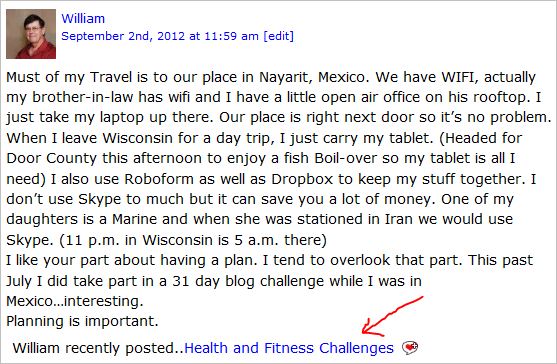
For instance, here is a comment made yesterday on my post about working from home for long periods of time (like weeks or months). Notice the red arrow. William got an extra link directly to his most recent blog post.
So, what does this mean to me if I'm using blog commenting as a traffic method?
If you are leaving blog comments in an effort to generate more traffic to your site, you can do two things.
1. Write really sexy headlines.
2. Comment on blogs that have CommentLuv enabled.
The combination of the two can attract more traffic from the efforts that you're already putting in.
How do you find blogs that have CommentLuv installed and enabled?
That's where I'm going to help. I started three lists on List.ly that can become valuable resources – with your help.
They are:
THESE LISTS ARE INTERACTIVE! That means that you can click “Like” and add your favorite blogs, too!
How do you Add your Blog to these Lists?
Do you want to attract more commenters to your blog? If so, you'll want to add your blog to my lists.
Here's how…
First, you figure out which list is most relevant to you.
- If there is a list above where your blog fits, keep reading.
- If I haven't created a list for your genre, leave a comment and I just may do so and add it here if there's enough people in that niche/market.
Once you've figured out which list you want to add your blog to, it's simple.
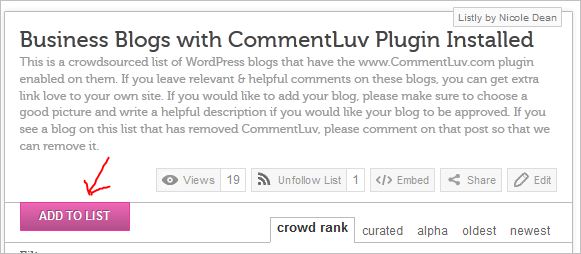
1. Click on the “Add to List” button. It's big and pink. You can't miss it.
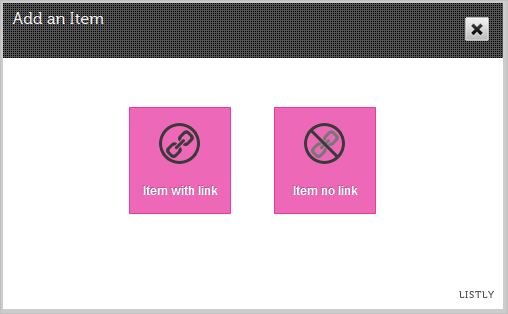
2. Choose “Item with Link” option.
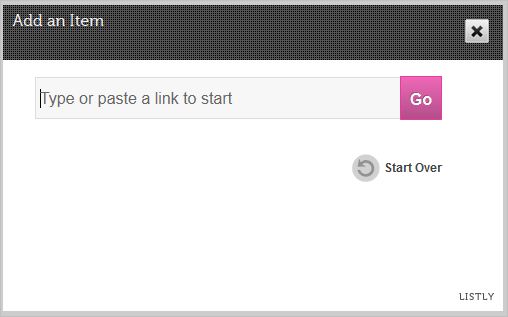
3. Enter your URL and hit “Go”.
4. Fill in the blanks.
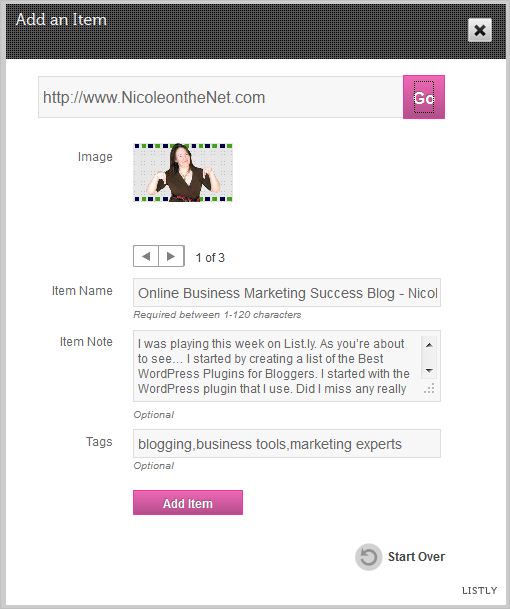
- Choose a picture. (If you don't have a good option, you can edit after you save.)
- Item Name – remember this is a link to your site for SEO, but you also want good copy.
- Item Note – a sexy little description to make people click (I recommend you enter one.)
- Tags – optional, but always nice.
5. Click “Add Item”.
Do you Like my List.ly Lists?
You can embed any of my lists on your blogs – free. Share great interactive content with your readers – and be the “go to” expert in your field.
Action Items.
1. Bookmark this page so that you can come back in the future and find blogs where you should comment.
2. Install CommentLuv and then add your blog to the List.ly lists if you wish.
3. Leave a comment below to tell me if you use blog commenting as a strategy – and how it's working for you or if you have questions or tips.
That's all for today.
Yes, there will be more lists coming… I've got to learn how to use this thing if I'm going to be able to recommend it in the future.
Have a beautiful day. You deserve it.
Warmly,
Nicole Dean
Recommended Resource
Are you Ready to Learn More Tips to Make
Blogging Faster and More Productive?
debralmb
September 18, 2012 at 3:23 pmSo, is comment luv sort of like the do-follow movement I read about recently?
Nicole
September 18, 2012 at 6:14 pmDebra,
There is a dofollow/nofollow feature to CommentLuv, but it’s much more than that.
If you look at your comment above, you’ll see that it says “debralamb recently posted… (and your blog post)” – that is put there by CommentLuv and is not part of the regular WordPress commenting system.
debralmb
September 19, 2012 at 9:21 pmI did notice the kind link to the article after I wrote my question. Thanks for that, Comment Luv info and response. Will be adding to mine too. I had noticed Comment Luv before but didn’t really know what it was about.
I’m learning so much and having so much fun too. I just read your post from a while back on Computer Butt and thought that was hilarious and such a great idea for a post. How many people can relate, huh? And, I’ve learned what PLR is now, too, from your blog. Lots of info. Thanks.
Geoff
September 18, 2012 at 5:41 pmI’ve been using Comment Love on all my blogs (yes, I have several of them!) for many years. I’m so glad more and more people are catching on.
Thanks for the blog curation! What a great idea.
Geoff
Nicole
September 18, 2012 at 6:13 pmI do love CommentLuv. I am excited about the Premium version as I hadn’t had it installed before.
Thanks for stopping by, Geoff. Always love to see you here!
N
Jennifer
September 18, 2012 at 4:48 pmI have been using Excel to keep a list of commentluv blogs (mostly food or mom blogs). I think I have over 100 now on my list. I find that if I leave 5-10 comments a day, it really helps.
Any chance of you adding either a health or food category? My blog would fit into either one.
Nicole
September 18, 2012 at 6:09 pmHi Jennifer.
Great idea. I just added a new list for Health Bloggers like yourself. You’ll see it listed above now.
Warmly,
Nicole
Ellen Britt
September 18, 2012 at 4:52 pmGreat post Nicole! Denise Wakeman introduced me to Comment Luv and we installed it on The Future of Ink…I added our blog to your Business Blog list above…
Ellen
Nicole
September 18, 2012 at 6:10 pmHi Ellen.
Thank you!
I accidentally deleted the listing for The Future of Ink, so I added it again myself.
If you want me to change anything in the listing, please email me quick and I will.
Hugs,
N
Denise Wakeman
September 18, 2012 at 4:54 pmIsn’t List.ly a great tool? Love how easy it is to create and share and crowdsource great content. Thanks, Nicole, for this list of CommentLuv blogs!
Nicole
September 18, 2012 at 6:12 pmHey Denise.
Yes, I am definitely having fun experimenting with List.ly. Thanks for adding your awesome blog to the list.
See you soon, I hope!
N
Doug Champigny
September 18, 2012 at 6:02 pmGreat idea, Nic – now we just need to watch & see which ones are also do-follow blogs…
Thanks for the heads-up on the List.ly site – have just started a list for fitness & exercise blogs there.
Sharyn Sheldon
September 18, 2012 at 5:22 pmNicole, this list is soooooo helpful. I love Commentluv and I actively look for commentluv blogs both when commenting and when looking for guest blogging opportunities. I don’t even remember now where I first heard of it, but I’ve had the premium version for awhile.
Never heard of List.ly before, but it looks like a great tool. I’m definitely going to be sharing that one!
Bill Davis
September 18, 2012 at 7:02 pmThis is an awesome idea, and thank you very much for providing this outstanding resource, Nicole!
I do use blog commenting for traffic and SEO purposes; always have and I suspect that I always will.
Karen
September 19, 2012 at 12:11 amI find Commentluv really useful. I definitely get more clicks from comments I leave if they have commentluv and readers can see my latest post. So I’ve installed it on my own blog as well.
Any chance of creating a list for bloggers who blog about writing/publishing. There are a lot of us out here!
Edie Dykeman
September 19, 2012 at 2:25 amNicole, I’ve been using CommentLuv on a number of websites for quite a while, but found I got quite an increase in spam. I’m not sure why you are using the word sexy as far as encouraging more interesting titles and descriptions, but beware of the wording you use. Unless there is something I wasn’t seeing in the plugin as far as preventing spam, using certain wording could cause problems.
I’ve commented on blogs and sites that have CommentLuv and do like the plugin as far as gaining more comments on my own sites and increasing traffic as well. I’m glad you have created these lists – what a great idea.
Alice Coaxum
September 19, 2012 at 9:22 amI’ve used Comment Luv on other blogs when I leave a comment but after reading this post, I’ve installed it on my own blog and added my blog to your list. This seems like a great way to get more comments and interactions. Thanks for sharing this information.
Val
September 20, 2012 at 9:41 pmI’ve been using commentluv premium since it came out. It was instantly an amazing help with the spam on my sites! Probably the biggest reason I decided to buy it up right away as I was having big issues on one of my sites.
I have not been using it for traffic and that needs to change. Thank you for the lists to help me along with that goal 🙂
Jeff
September 22, 2012 at 11:10 amThis is an awesome resource! I really appreciate you putting all this together.
Loretta
September 22, 2012 at 12:24 pmI installed the free version to try out on my niche blog (the one linked in this comment), but I had uninstalled it on my craft blogs quite awhile ago because of massive increase in spam from being on lists going around for awhile a few years ago that were “do follow” and “comment luv” blogs. I’m willing to try it out again for awhile and see what happens, hopefully the spammers have gotten bored and moved on to using some other fad method.
Nicole
September 22, 2012 at 12:46 pmLoretta, likely you will get more spam. Do you have a spam plugin that you’re using? I get thousands of spam comments a week, but Askismet handles them … pretty well. I have to pull people out on occasion, but it’s worth it – to me.
N
The Mom
September 22, 2012 at 12:42 pmJust installed free version of CommentLuv to give it a try. It will be fun to see what happens. 😀 Thanks Nik.
Nicole
September 23, 2012 at 12:44 pmNo problem, Mom.
Hope you get lots of interaction!
N
Pavan Somu
September 22, 2012 at 8:58 pmCan’t find the add to list button.. Could u help me out.. I have 3 commentluv enabled blogs.
Nicole
September 23, 2012 at 12:42 pmHi Pavan – the link to add your blog is at the top of each list (see illustration below).
Warmly,
N
The Redneck Princess
September 22, 2012 at 9:25 pmI have had comment luv for a while now, I love it!! It keeps me up on my friends blogs too!!!
Sumit Jha
September 22, 2012 at 9:42 pmI just love commentluv. It not only help me to get more engagement on my blog but also reward my readers with PR juice.
Natalie
September 22, 2012 at 11:38 pmCan you start a list for the travel niche?
Nicole
September 23, 2012 at 12:46 pmCertainly. Here you go: http://list.ly/list/1o9-travel-blogs-with-commentluv-plugin-installed – You get to be first. 🙂
Janette Fuller
September 23, 2012 at 6:21 amI have a book blog where I write book reviews. I am not sure if this would be in the “Business” list or not.
Tom Treanor
September 24, 2012 at 9:49 amHi Nicole – great idea and use of Listly! I added the Right Mix Marketing Blog as well in the business blog section (comment-luv enabled of course!). Thanks for dropping by my blog earlier today too!
Christine Brady
September 28, 2012 at 8:08 pmHey Nicole!
I went to add my blog to the list and I was already there!
So deleted the submission I just entered – Ooops.
Thanks!
~Christine
Christine Brady
September 28, 2012 at 8:10 pmSorry – delete.
Kulwant Nagi
October 6, 2012 at 2:22 amCommentluv is a perfect plugin and other secure plugins like GASP made it more powerful. I loved this plugin and using on all of my blogs now.
Daniel Dumas
October 8, 2012 at 6:18 pmHi nicole! thanks for this i just added my blog to your list. 🙂
vikram
October 8, 2012 at 11:51 pmI know this is somewhat of an older post, but I’ve been coming back to this list religiously most every day since I originally found it. Thank you so much for compiling all of these links in one spot! I just discovered CommentLuv (and it’s been installed on our website) and have been trying my best to take advantage of this awesome addition.
Craig Scarr
October 10, 2012 at 5:35 amI find the comments on this blog has lots of useful information. Thanks to the writer of this post and also thanks to the commenters.
Michael Belk
October 17, 2012 at 7:35 pmYou did a wonderful job highlighting the benefits of the plugin and you went another step and provided us with more blogs to comment on.
You are too kind, I really appreciate your efforts.
Roger Mendoza
November 6, 2012 at 2:05 pmCommentLuv is a great system. However, I always have problems with some sites not showing the last blog post or sometimes even allowing me to post. Great article on how the CommentLuv System works.
Just as another note, doFollows may sometimes be dangerous, since some sites might be less then quality and google will look down upon those backlinks..so choose your backlinks carefully. Good Luck to all.
julie
November 11, 2012 at 1:22 pmThanks for sharing the “Luv”, Nicole. I didn’t realize you could pick the blog posts you want shown. Look forward to seeing how they will continue to improve it.
Deepak
November 16, 2012 at 5:31 amNicole thanks for sharing this wonderful article about comment Luv
Shyxter
November 19, 2012 at 7:43 amHi, Nicole! Thanks for making this. I really appreciate that you have categorized the blogs according to their niches. The CommentLuv plug-in is such an amazing tool that makes blog commenting fun and productive. I have also added my blog to the Health Blogs category 🙂 Many thanks again!
Vivek Bhatt
December 1, 2012 at 12:18 amHello Nicole , would like to Thank you. i recently found your blog , and found many amazing Articles on it. thanks for sharing it. i would like to ask something here. i don’t have comment luv plugin but i heard it’s available . so is it okay to use free comment luv plugin ? thx again
Nicole
December 1, 2012 at 8:36 amHi Vivek.
Yes, the free version is just fine to start with. I did.
I eventually upgraded as I like the features of the Pro version.
Hope that helps.
Nicole
Vivek Bhatt
December 7, 2012 at 12:59 pmHi Nicole Again
Feeling relax now, because until today I’ve been hearing that the free comment luv plugin may results in a bad SEO. But As you said , I enabled it as well 🙂 Thank you so much!! Looking forward to read more Articles , i really enjoy and learn something new here 🙂
Al Williams
December 3, 2012 at 12:13 pmthe trouble is that most blogs with commentluv just end up awash with comments that doesn’t add value to anyone.
The Budding Blogger
December 5, 2012 at 2:54 amHi Nicole,
You have some really great stuff here especially for newbie bloggers like myself.
I recently (yesterday) came across “comment luv” and find it very attractive. Trouble is I feel it would be used quite selfishly by most people. You could end up with spammy posts from people just looking for the links back to their sites.
All said I will be a regular visitor to your blog. Its very enlightening.
The Budding Blogger
Entrepremom / Mommy Iris
December 6, 2012 at 6:24 amI’ve been using commentLuv for 2 months now and I love it!
Donny
December 6, 2012 at 10:59 amCommentLuv isn’t just a great way to get more comments and likes on your blog, but a great way to get dofollow links back to you. I search for CommentLuv lists and try to put relevant comments out there, and I in turn get some nice link juice back to my site. It’s a win/win.
Brian
December 20, 2012 at 3:47 pmI’ve not yet added commentluv to my website. But since I’ve seen that it generates traffic, I may have to begin using it. Looks like Google just penalized my site yesterday for either using the “fetch as google” feature in webmaster tools or by upgrading my Yoast plugin. I’ve lost half my traffic and must get it back. Maybe commentluv will help some.