
Get More Time Back: How to Stop Facebook Notifications
I love Facebook. I truly do. But their notification system leaves something to be desired. I get notifications for all kinds of crap. 🙂 (Excuse the language, but anything that takes my time without my permission is very frustrating.)
If it drives you crazy, too, I hope you will LOVE this blog post that I just whipped up.
What are Facebook Notifications?
There are three types of Facebook Notifications.
- Email Notifications that come to your email address.
- The Little Flashy Notifications that pop on your screen as you're on the site
- The Notifications that you see in the notifications bar.
We're going to talk about #2 & #3 in this post. (Although I also have info on how to manage the email notifications in the PS below, just in case they're making you bonkers, too.)
What is the notifications bar? Look up by the Facebook logo when you're on Facebook.com. There's an earth to the right. It changes number to let you know there are notifications for you.

The notifications could be anything from someone liking one of your comments, to a comment that was left on one of your posts, to a game request, to an app, to an event invite.
They can be really helpful to let you know who is interacting with you, if you can keep all the other clutter out.
This is what we're trying to manage.
First Turn off the Group Notifications that you Don't Want.
One of the types of notifications that can get out of hand quickly is your group notifications.
If there are groups that you don't need anymore (or that you were added to without your permission), you can leave them. That obviously stops the notifications.
BUT – what if there's a group that you love? And, you want to stop in once a day and see what's up, but you don't want to be getting “dinged” all day long.

- Go to that group.
- On the right side of the screen, it says “Notifications”.
- Click that.
- Then, choose which types of notifications you would like to see (if any).
You have your choice of just getting notifications when friends post, turning off the notifications that pop up on screen entirely, or updating the email preferences for all groups (which is covered in teh PS below).
When You're Following a Post that You're No Longer Interested In.
Let's say you “Like” or Comment on a post that a friend made on their profile because you are trying to be nice. What you did not expect was for everyone and their grandma to start arguing in the comments on that post.
So, your little notification light is going crazy and you've got the bottom corner of your screen flashing every few minutes in all caps as someone else starts yelling. AHHHHH.
Here's what you do. Find the original post (by clicking on one of your notifications) and then click the “Unfollow Post” link.
See it?
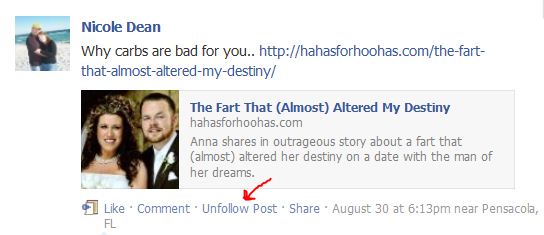
That's much better.
Turning off Game Notifications and all that Jazz.
I keep my notifications clean, if you haven't noticed. Time is money. Here's how I turn off the notifications from FarmVille and all that stuff.
(Excuse the secrecy but my latest notifications were from my private “Failed Adoptions” support group which is obviously not businessy stuff. So, I had to block it out in order to finish this post.)
So, let's say that I want to stop getting invites to the “Birthdays” app. I'm not necessarily saying that I do, but we'll use it as an example. 🙂
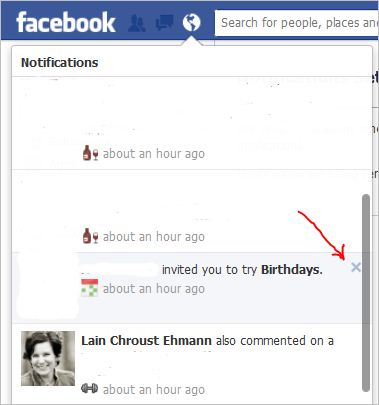
When you open your notifications, all you have to do is hold your mouse to the right side of that particular notification and an “X” appears. You click that.
You will see this message next:

At that point, you can choose to turn it off, or if I had accidentally clicked on Lain's notification instead, I could quickly say “NOOOOO. Keep on!” 🙂
I hope this saves your sanity. It's definitely helping mine.
Warmly,
Nicole Dean
PS. Here's the scoop on managing email notifications.
How Do you Turn Off Unnecessary Email Notifications in Your Settings?
If you go to your Account Settings, there is a tab called “Notifications” inside there. (Or click here: Facebook Email Notifications)
When you go there, you will see a screen that looks like this:
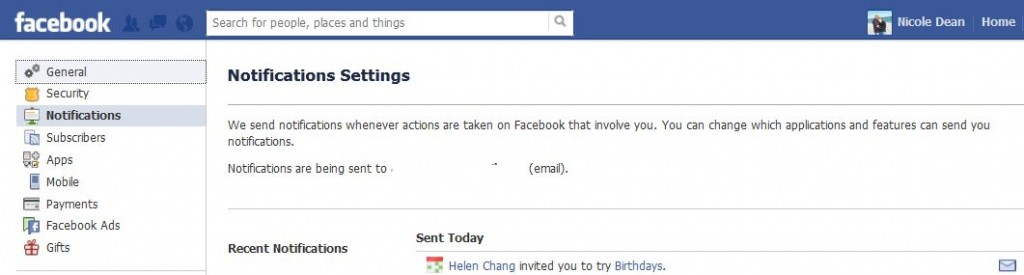
Scroll down the page. You have the option of choosing what you will and will not get email notifications about.
I would say DEFINITELY get notifications anytime someone posts on your wall, comments on your wall, or tags a photo of you. (Just to make sure your old high school buddies don't go drunk posting old embarrassing pictures of you or something.) The rest is pretty much optional.
Tom Watson
October 4, 2012 at 3:27 pmHey Nicole!
Just wanted to say THANKS for all the great stuff you send our way. Though I’m rather new to the Internet Maketing scene (less than 3 years), I’ve learned a lot from you (and your buddy Melissa). I love the products I’ve purhased and look forward to whtever you send our way down the road.
Nicole
October 4, 2012 at 7:36 pmAwww… Thanks, Tom! 🙂 That means a lot to me.
Come back soon.
Kulwant Nagi
October 6, 2012 at 2:39 amReally very annoying when we get the message like “Someone commented on photo of you”. And getting too much mails in the inbox is also very annoying. I am going to do all the things you mentioned here to get rid of such headache.
Raina Bright
October 9, 2012 at 12:39 amVery useful info – thanks! Too many notifications about things that don’t really warrant being notified about (sorry, dear friends who want me to know they watered a plant in Farmville) is distracting and often annoying. Facebook is very customizable and many of peoples privacy and/or security concerns can be addressed by utilizing the ability to alter your settings.
steven
October 11, 2012 at 8:32 amhi Nicole. I had that problem due to loads of email notifications that would come unstoppably from facebook account, even for the most unimportant reason. It was extremely frustrating to receive notifications even from groups where somebody else had invited me in. I did exactly what you describe in your article and got rid from all of this clutter.
Kristal
October 11, 2012 at 10:15 pmI recently had a friend that was posting pictures and other things WAY too often. I’ll admit that I like some of them. But it seems that I have to scroll too far to get to others content. I have tried limiting pictures from her. Crossing fingers. Dont want to block everything…
Lavanya Sethi
October 18, 2012 at 12:23 amThanks for sharing such useful information. I own a facebook account & love to chat with my friends but these notifications!!!! I was just irritated with many kind of useless notifications in my account and wanted to stop them & the above trick helped me a lot.
Thank you so much