
Best WordPress Plugins that Marketers Use
It’s another Expert Briefs, where I ask really smart business owners to answer your burning questions.
If you've missed past Expert Briefs, you can click on the undies to see them all –>
This week I asked our panel of experts a question that I've been thinking about lately.
“This question is about blog plugins. We all know about Akismet and All in One SEO and the other commonly known favorites.
Of all of the plugins that you've got installed on your own blog, tell us about 1 or 2 gems that you use that aren't as widely known.”
 Shannon Cherry of List Building Promotion Secrets says:
Plug-in. Plug-in. Who's got the Plug-in?
I will admit I am almost as addicted to plug-ins as I am domain names. And why not? There are more than 10,000 of them out there to pimp out your blog. But if I had to narrow down my favorites, here are my top three:
- Thank Me Later. This one allows me to email first time commenters automatically. You can write up the email to remind them about your RSS feed or just to invite them to connect with you personally. (I do both!)
- SEO Scribe. This is a subscription based plugin (meaning you have to PAY for it). It works with All In One SEO Plug In to analyze each blog post for the best SEO. It finds keywords and event backlinks you can use. Best of all, the subscription can be used on multiple blogs at once (currently I use it on 4 of them).
- WPTouch iPhone Theme.This plugin will instantly make your site optimized for mobile browsers, while keeping your normal theme for people browsing your site on their PC. If you don’t use a heavily customized theme, then this plugin will be perfect to you.
Now there is ONE plug in I don't get that comes with the WP install: Hello Dolly! Can someone please tell me why that's in there?
 Mark Mason of MasonWorld.com says:
This is an easy one for me.
I have 36 active plugins currently installed on MasonWorld.com, but the one I like the most is W3TotalCache (W3TC). I was previously using WPSuperCache, but I was having some page load time performance problems, particularly right after sending my list to my blog. So, I did some research and switched to W3TotalCache.
According to the W3TC people..
W3 Total Cache is the fastest and most complete WordPress performance plugin. Dramatically improve the speed and user experience of your site. Add browser, page, object and database caching as well as minify and content delivery network (CDN) to WordPress.
The cool thing is that W3TC uses Amazon S3 and Cloudfront (that the CDN thingy referenced in the blurb) to host some of the more frequently downloaded files on my site, and that helped performance a lot.
Regards,
Mark

Kelly McCausey of Work at Home Moms Talk Radio says:
I'm utterly dependent on the Broken Link Checker plugin. I have several WordPress sites with thousands of pages of content going back five years or more. Dead links are going to happen and I love how easy it is for me to remove or update them with this plugin. This is especially important with affiliate links that have gone dead but cleaning up dead links in general is important if you don't want to annoy your web visitors.
I'm using the WP-Invoice plugin on one of my service based websites where I often work long term with clients. The WP-Invoice plugin allows me to simply issue a web based invoice for monthly retainers and incidental projects. My client can then easily pay via PayPal. I love that I'm able to view pending invoices right within my WordPress site.
 Lynette Chandler of TechBasedMarketing.com says:
Alright, I'll admit I'm partial to plugin since we developed it:)
1. List Authors Plus – this allows finer control over how authors are listed. You can display authors using the plugins' template tag or using sidebar widgets. Really handy when you have a bunch of accounts on your blog but not all account holders warrant a mention on your authors listing.
http://wordpress.org/extend/plugins/list-authors-plus/
The rest of the list were not developed by us though we have more in the works 🙂
2. WP-Invites – allows you to create an invite code and only those who enter the correct invite code will be able to successfully register on your blog. I love this (and similar plugins) because we often request guest posts and we like to have our guests create their own account for both their convenience and ours. But at the same time we do not like to have the blog open for others to register either this stops unauthorized people and spammers from creating accounts yet still automates the author's account creation process.
http://wordpress.org/extend/plugins/wp-invites/
3. Syntax Highlighter and Code Prettifier Plugin for WordPress – I'm not sure not many people know about this but certainly not many non-techies know how to use this. I find WP-Syntax great for affiliate sites – as in sites where affiliate managers post updates and codes etc. One of the problems with WordPress is, when you try to post a text article inside a textarea, you will get unexpected results with the line breaks. In short, it doesn't make easy copying and pasting. This allows you to create boxes for code and copy/paste text and also
makes it easy for people to copy and paste.
4. WP Mobile Edition – Pretty self explanatory – allows you to display a mobile version of your blog/site to those who are viewing on mobile devices.
http://crowdfavorite.com/wordpress/plugins/wordpress-mobile-edition/
5. Header-Footer – Don't you hate it when you have to install a gazillion plugins just to add a code to the header or footer of your site? Many don't realize, you don't have to. This allows you to add any type of code into your headers and footers and cut down on the number of plugins too, reducing that plugin mess (yay!)
http://wordpress.org/extend/plugins/header-footer/
6. RunPHP, PHPExec, PHP Execution – lets you add PHP code into your posts, pages. While true it works well only if you know what you're doing with PHP but oh it can help you do a multitude of things. Like automatically add your affiliates' ID to your products links on the page. I've used it many times to do that and am sure affiliates appreciate the extra help.
7. ThemePerPost – love this. Lets you use different theme for a post or page http://wordpress.org/extend/plugins/themeperpost/
I'd have to end this by a small advise to do your due diligence on any of the plugins mentioned. While we have run it without problems and have not encountered rogue code in them but our servers may be configured differently than yours and also files on download pages change from time to time.
Got some feedback on Twitter from Warren Whitlock:


Denise O'Berry of DeniseOBerry.com says:
It's hard to believe that just a few years ago, small business owners had to struggle with learning how to code html or php if they wanted to build their own website. WordPress has made life so simple for do it yourselfers.
And it continues to get better and better as the platform matures and those cool techie folks out there create plugins that make our lives simpler.
Like most small business owners, my websites have the standard plugins to battle spam and allow for social sharing. But one of my favorite plugins — that's not so common — is Add Sig, a plugin that allows you to add standard and custom signatures at the bottom of your posts. You can find it here http://www.dagondesign.com/articles/add-signature-plugin-for-wordpress/
I've used this plugin to add guest blogger bios, affiliate products, email list sign up forms and many other options. It's simple and takes just a few minutes to enter or change without requiring a ton of technical knowledge.

Connie Ragen Green of ConnieGreen.com says:
I have found that less is more when it comes to plug-ins, so I choose them carefully before installing them on my blogs. The ones I'd like to share are
the broken link checker plug-in and the drafts dropdown plug-in.
I include links in most of my posts, and I always check them before I publish them. However, things beyond our control often happen, resulting in broken links and unhappy readers. The cure for this is the broken link checker plug-in, which lets you know when a link on your blog is no longer active. This gives you a chance to correct it, replace, it, or simply remove it.
I post regularly to two blogs, so I tend to write partial posts and save them as drafts. The drafts dropdown plug-in makes it so easy for me to choose
which draft I want to work on, saving me lots of time.

Pat Flynn of The Smart Passive Income Blog says:
Hi Nicole,
Here are a couple of gem plugins that most people probably don't know about:
- Broken Link Checker: this plugin is great because it will automatically detect any broken links on your WordPress blog, either links that you type in yourself that were just not typed in correctly, which happens from time to time, or links that used to work but do not anymore because the page that it points to is no longer available.
- Robots Meta: this plugin, which is a bit more advanced, allows you to choose a number of settings for your WordPress blog as far as what the search engine spiders can and cannot crawl through. So for example, if you want to create nofollow links for your comments or for your archive page, it's just a click of a button away. Also, each new page or post that you create has a setting where you can choose whether it should or shouldn't be indexed by Google, which comes in handy when you are creating more private type pages, such as landing pages for lead magnets for opting into an email list.
Cheers!
-Pat
 Alice Seba of Contentrix says:
I'm pretty old school when it comes to marketing. I don't look for fancy marketing tools or plugins for every little thing. However, I am a big fan of saving time and automating things where it makes sense. With that in mind, I have to make a little plug for my own plug “Speedy APLC Publisher”. It is designed for our members at allprivatelabelcontent.com and it allows them to instantly load their PLR articles into WordPress. But the cool thing is, it can be used for any content. Whether it's PLR you bought elsewhere, articles from a ghostwriter or stuff you wrote yourself. As long as it's in .txt format, it can be uploaded.
It allows you to:
* Mass upload of articles in .txt format
* Schedule imported articles for publication e.g. Every 1 hour, 24 hours, 72 hours, etc.
* Upload the articles as drafts if you want to edit them before they are published.
* Choose your categories. Publish all articles in one category of your choice or individually select a category.
* Choose your authors. Assign all articles to one author or individually assign articles to author(s) of your choice.
It's a great timesaver, even if you plan to edit the content. All you do is upload the zip, make your setting and everything is ready for you to work your magic.
Here is a video showing how the publisher works.
 Denise Wakeman of Blog Squad Tips says:
Great question, Nicole! I usually go for plugins that make things easier and automate tasks.
I especially like …
- Viper’s Video Quicktags: Super-easy way to add videos from YouTube and other video sharing platforms to your posts.
- Photo Dropper: Lets you easily find and add creative commons licensed photos to your posts from Flickr.
 Nicole Dean of .. here! .. says:
I currently have 25 active plugins on my blog, but amazingly I don't have the broken link checker. I'll have to add that one today since it sounds really handy. Then have my Virtual Assistant go through the broken links for me and fix them. 😉
As for my favorite plugins, it was easy for me to choose mine, and I was surprised that they hadn't been mentioned yet.
My absolute favorite three WordPress plugins are:
- WordPress Editorial Calendar
- Datafeedr Random Ads V2
- Page Links To
I also depend on Podpress to keep my podcast running, but I didn't think that was really a “hidden gem” so I'll just mention it in passing as my other most favorite plugin.
Here's a bit about each one so you can see why I love them.
1. WordPress Editorial Calendar.
Their description says:
The Editorial Calendar makes it possible to see all your posts and drag and drop them to manage your blog.
The Editorial Calendar is basically a way to organize and manage your blog posts.
I've found that it's especially useful if…
- You're a visual person
- You like to plan your posts and promos in advance
- You're outsourcing
- You have guest bloggers or a community blog where others are contributing to your blog
- You have theme days (like I do these Expert Briefs)
- You're doing a challenge or contest of some sort (like my month-long Computer Butt Challenge)
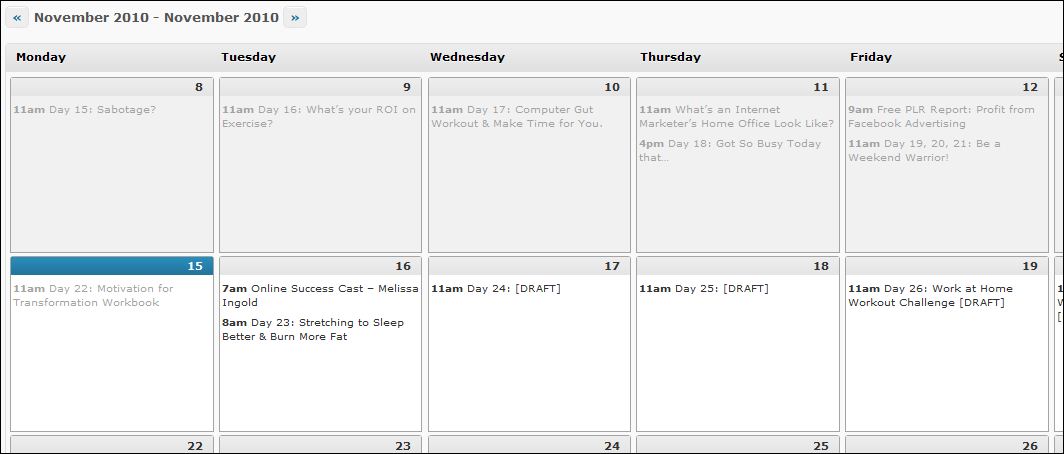
Here's a screenshot that I took on Monday (the 15th) of my blog calendar. You can see that I already had two blog posts scheduled for Tuesday, ready to post.
If I didn't have this plugin, I think I'd have gone crazy(ier) by now. 🙂
Click on the image if you'd like to see it full size.
2. Datafeedr Random Ads V2
Their description says:
The Datafeedr Random Ads plugin is a free plugin which allows you to simply and easily show random ads anywhere in your template files or using widgets.
Here's a video to show you how I use it on this blog. I have it installed on several other blogs, but thought you'd be most interested in seeing behind-the-scenes here.
3. Page Links To Plugin.
Their description says:
Allows you to point WordPress pages or posts to a URL of your choosing. Good for setting up navigational links to non-WP sections of your site or to off-site resources.
The easiest way to show you how this works is to point you to my navigation above. If you go to the top navigation where it says “Tools I Use in My Business” – hold your mouse over those words and you'll see a list of sub-pages.
If you click on some of the pages that display, you'll be taken to pages here on my blog. If you click on others, you'll go directly to other sites where you can learn more about the tools. I didn't have time to create pages for each tool yet, but wanted my readers to know what I personally use in my business, so I started to list them there.
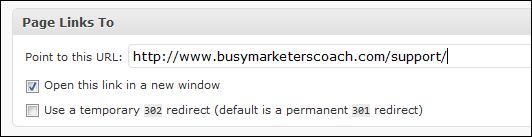
Here's what the plugin looks like when you're using it. This is my settings for my “Contact Me” page under “About Nicole” on my top navigation.
It's Your Turn.
So, now, I'll pose this question to you. What are your favorite lesser known plugins? I'd love to hear what you have on your blog!
Warmly,
Nicole Dean
PS. I have created brandable reports from several of the previous Expert Brief columns that you can use to earn commissions by giving them away.
If you’re new to expert briefs, don’t miss these favorites:
Alan Petersen
November 18, 2010 at 9:57 amGreat list of plugins! A few sweet plugin listed that I don’t have installed. Thanks.
Here are a couple more plugins that I dig and they’re both free…
TweetMeme – it adds a “re-tweet” button to your WordPress posts to encourage folks to tweet your stuff.
http://help.tweetmeme.com/2009/04/06/wordpress-plugin/
podPress – awesome plugin that makes it easy to turn your audio and videos into a podcast so you can easily submit to iTunes for traffic and exposure and it adds a cool media player to your posts. And lots more. Here are the features listed on the plugin site:
Features
* Full featured and automatic feed generation (RSS2, iTunes and ATOM and BitTorrent RSS)
* Preview of what your Podcast will look like on iTunes
* Podcast Download stats, with cool graphs. See below.
* Support for Premium Content (Pay Only)
* Makes adding a Podcast to a Post very simple
* View MP3 Files ID3 tags when your Posting
* Control over where the player will display within your post and what it will look like.
* Support for various formats, including Video Podcasting
* Supports unlimited number of media files.
* Automatic Media player for MP3, OGG, MP4, MOV, FLV, SWF, ASF, WMV, AVI, YouTube, and more, with inline and Popup Window support.
* Preview image for videosSupport for separate Category podcasts
http://www.mightyseek.com/podpress
Angie Newton
November 18, 2010 at 10:04 amGREAT post! I use very little when it comes to plug in’s but it’s funny, I just posted a question over on Lynn’s elite forum asking about a certain plug in. Will post here too so I might get some input.
I’m looking for a plug in where those who comment on my blog will get an email letting them know someone has replied to their comment. A gal of one of the blogs I read says she uses the WordPress Thread Comments plug in for this. Would this be OK to use if I’m already using threaded comments within my blog theme? Any input would be appreciated.
Nicole
November 18, 2010 at 10:14 amHi Ang,
I use this one.
http://txfx.net/wordpress-plugins/subscribe-to-comments/
Is that what you’re looking for?
N
Kathryn Griffiths
November 18, 2010 at 10:29 amI’m using Tweet Old Post. It randomly tweets old posts to Twitter. That way… my posts are always in front of my followers.
The Mom
December 11, 2010 at 10:21 amIs that how they do it!? I find a lot of great reading/research on several favorite blogs through Twitter. I really appreciate being able to quickly see in Twitter if a blog post fits my interest without scrolling through pages and pages of blog posts. Very cool! I’ll have to consider this one. Thanks for shining a light on this one for me.
Denise Wakeman
November 18, 2010 at 11:08 amWow, this is a wealth of information! I definitely have to check out and add broken link checker. Shannon Cherry mentioned WPTouch and I read a great review today about that one as well by Darren Rowse of Problogger.
Gail Hess
November 18, 2010 at 12:49 pmWow – great plug ins.
I am definitely going to check out some like the broken link checker.
Chuck Brown
November 18, 2010 at 1:51 pmSome of the stuff I use:
Contact Form 7 (keeps your email address off the page)
Google Analyticator (brings your Analytics stats for a particular blog right into your WP Dashboard)
HungryFEED (allows me to bring in a relevant news feed via RSS…giving me some fresh content on an ongoing basis). Example page: (http://selfconfidencetips.net/confidence-tips-news/)
SEO Siloing (I like this solution much better than the Archives and Recent Posts options). It offers the ability to create a quick-list of blog post titles on a single page. You can have one for each category, and it displays titles rather than the blurbs that take up so much room. Download link for plugin (http://www.memwg.com/seo-siloing-wordpress-plugin/). Example of a page generated with the plugin (http://audiobooksinreview.com/reviews/).
Simple Google Sitemap XML – I’m a fan of sitemaps as well. This uses a non-standard location for the xml file, but it’s very simple and seems to work quite well. I don’t like stuff with too many options. 😉
Denise O'Berry
November 18, 2010 at 3:51 pmWow! What a great list of plugins. Looks like a winner for that broken link checker — one I’m certainly going to check out. Your comment about the editorial calendar was a funny one Nicole. I was going to mention it but thought a ton of other people would too, so I passed. Glad you did. I can’t live without it. Thanks for the chance to offer my thoughts.
internet marketing
November 18, 2010 at 5:48 pmW3TotalCache is the find for me. thanks.
Alice Seba
November 18, 2010 at 9:29 pmOh yes, I use Datafeedr Random Ads…love it! Very easy to add rotating ads. I second Nicole’s nomination. 🙂
Stephanie Watson
November 19, 2010 at 3:12 amI’m so happy to read this. I am installing the WordPress Publication Calendar and I’m so thrilled. I schedule posts months in advance and this is going to make my Virtual Assistant’s life much easier! Thank you!
I love Datafeedr Random Ads too, and I like Share and Follow, oh and WordPress Automatic Upgrade :). Thanks for sharing everyone!
Russell Hart
November 19, 2010 at 3:19 amHi Nicole
This maybe the wrong place to put this query, but I’ver tried to access your free IM Product Reviews and my computer tells me it can’t find it from your link …
Download your free
Internet Marketing Product Reviews Here.
ALL REVIEWS COME WITH UNRESTRICTED PLR RIGHTS.
Download all Product Reviews here. (.zip file)
Can you please help me with this?
Regards
RUSSELL
Nicole
November 19, 2010 at 8:14 amHi Russell-
It’s working for me. Odd.
Here’s the .zip file for the free product reviews. Enjoy!
http://www.easyplr.com/dc/IMProductReviews.zip
Warmly,
Nicole
Diana
November 19, 2010 at 8:17 amGreat information. Thanks to all who contributed to this post. I have bookmarked this site to refer back to when building my next site.
Some I already use and others I’ll be trying.
Thanks again.
Laura
November 19, 2010 at 9:32 amOne that I like to use is WP Post Columns: http://www.samburdge.co.uk/plugins/wp-post-columns-plugin-2
It’s really handy on pages where I’m just listing things that are so short that they don’t fill the width of my content area, leaving an awkward hole. This breaks them up into 2, 3, 4 columns, whatever width you want.
I’m definitely going to get the broken link checker, too!
Sheila Atwood
November 19, 2010 at 8:41 pmLove broken link check.
MaxBlogPress Ninja affiliate is the best investment in a plugin I have ever made. It cloaks my links, keeps stats and automatically hyperlinks my keywords.
Loretta
November 21, 2010 at 9:46 amI got some new plugins installed this weekend thanks to this lovely group 🙂 Thanks to everyone.
The iPhone theme plugin that Shannon mentioned was a huge help, I didn’t realize there was a plugin for that and it’s great to be prepared for those kind of visitors.
Definitely need to hang onto the broken link checker, very handy!
Two of my favorite plugins are….
Affomatic Ebay Plugin to display ebay auctions with your aff links
Future Calendar for scheduling posts, which is sort of like editorial calendar but not as fancy. I might actually try out the editorial calendar for awhile and compare to see which I like better.
Nicole
November 24, 2010 at 12:08 pmSo, what’s the verdict, Loretta?
Future Calendar or Editorial Calendar – which do you prefer? 🙂
Judy H Wright-Bully Advocate
November 21, 2010 at 10:55 amWOW, thanks so much for all the great tips and techniques. It is great to share and everybody wins. I am excited to add these on my blogs.
Judy Helm Wright
Staci Jansma
November 23, 2010 at 4:55 pmPageMash to help organize pages in one view – hide them – move them – etc.
Post to Twitter
Use Networked Blogs to get Post to Facebook.
DeAnna Troupe
November 26, 2010 at 9:02 amI could write a whole blog post about plugins. I like digg digg for social media sharing purposes. I’m definitely loving the editorial calendar plugin. I still might write that blog post about the plugins I’m using. Great post, Nicole.
Kevin Pritchard
November 27, 2010 at 6:34 amWow thanks Nicole, as I recently just started my own blog I’m always on the lookout for great plugins.
Kevin
Bradley Will
November 27, 2010 at 10:07 pmMy favorite of all time is Pretty Link which allows you to shorten and disguise any link as a extension of your domain name. Great for affiliate links. (ex. yourdomain.com/aweber)
Great blog post…thank you!
Erik Emanuelli
December 3, 2010 at 5:28 amNicole, thanks for the information !
I really love “Broken Link Checker” and “WPtouch”.
I also recommend “ShareThis”, the Social Media connection is very important.
Alexis
December 3, 2010 at 7:16 amHi Nicole!
Great question you asked.
My favorites right now are Thank Me later,Facebook Comments for WordPress.
Thanks for the post.
Ivette Matos
December 3, 2010 at 7:25 amHi Nicole, I am so impressed with all the great information you provide. This list of “Best WordPress Pugins that Marketers Use” rocks. I am certainly going to use quite a few of them, especially the Datareedr Random Ad. Thank you, thank you, thank you.
Keep up the good work.
Ivette
Julie Phineas
December 3, 2010 at 9:20 pmI installed and kept…
LinkWithin to get related posts with thumbnails at the bottom of posts.
The Socialite plugin and LinksAlpha to syndicate blog posts to my social networks.
Smart Ads to put ads at the bottom top or inside my posts.
AddtoAny for social bookmarking at the bottom of my posts.
Zemanta to insert relevant posts from other sites at the bottom of my posts.
VodPod to capture videos I post and place them in the sidebar.
Easy Contact for readers to contact me.
Akismet to catch spam comments.
I am looking for a good plugin to add breadcrumbs to the header portion of my posts as well.
Patti Stafford
December 7, 2010 at 8:07 pmHi Nicole,
I just grabbed the Editorial Calendar. I LOVE IT! You’re a genius for finding it and sharing it.
Great post! I’m off to get the Broken Link plugin and LinkWithin now.
Thanks for sharing!
Patti
The Mom
December 11, 2010 at 10:15 amHi Nik,
Editorial calendar? Yes, must have please. I have a lot of blog post drafts out there based on “National ~BLANK~ Day” and have to remember to go out and write/tweak/publish. I wish the clients I write for would get this – hint hint… 😀
John Kilgallon
December 19, 2010 at 3:09 pmI have used the following plugin on one of my recipe blogs to collect and publish posts in pdf. It’s called Anthologize. Here’s the summary from their site: http://anthologize.org
“Anthologize is a free, open-source, plugin that transforms WordPress 3.0 into a platform for publishing electronic texts. Grab posts from your WordPress blog, import feeds from external sites, or create new content directly within Anthologize. Then outline, order, and edit your work, crafting it into a single volume for export in several formats, including—in this release—PDF, ePUB, TEI.”
Great timesaver to republish your posts as a report or free ebook!
John
Marketing Footnotes
January 29, 2011 at 4:07 amI use the Pretty Links plugin to make my affiliate url’s look friendlier.
Cindi
February 11, 2011 at 7:35 amBroken Link Checker crashed both of my blogs. My favorite is No-Follow Reciprocity (which I did a post on).
Lots of new ones to check out here. Thanks!
Sarah
February 22, 2011 at 12:51 amThanks, I shall definitely try some of these.
I have just started a blog as a resource diarising bringing up kids with SID (www.mykidnsid.co) and have been through the pain of crashing the dashboard the other week.
I am just learning about auto-responders (not doing well on that), placing ads, and trying to get my twitter feed to show up on my blog – do you have any ideas on that? the couple I tried completely crashed my blog. I can link to my twitter page, but I wanted a feed in.
Thanks for all the useful tips 🙂
Sarah
Hansie
February 24, 2011 at 2:14 amCan any one help me with wp reciprocal linking plugins that work?or what you are doing to get links?
Roslyn Rajasingam, Working Mom Blogger
April 10, 2011 at 7:49 amThanks, Nicole.
The plugin suggestions here are very useful.
The Broken Link Checker seems to be pretty popular.
Ros
Holster Hottie
October 17, 2011 at 6:06 pmMy mantra is backup, backup, and more backup. I’m constantly backing up my databass on my website. My WP Plugin to help me with this is WP-DBManager. I’ve configured mine to e-mail me a backup of my database every day on all of my different WordPress sites. I love it and it’s bailed me out more than once!